What am I doing today?
Always Today is a calm to-do list that answers that one question every morning. Your lists live on your device, work offline and open at once, and they sync across your phone, your computer and your terminal when you want them to.
See how it works Free on one device
Out now on Google Play for Android phones and Googlebooks, on the App Store for iPhone and iPad, in the Microsoft Store for Windows, and as a download for the Mac, the Linux terminal and Linux desktops.
Today
Your day
This evening
Clear. Go outside.
Quiet, quick, and yours
Today, Upcoming, Anytime, Someday and a Logbook; areas and projects with headings; repeats that never double up; reminders. And four things that make it different.
-
Your lists live on your device
Everything works offline and opens at once, because each device keeps its own full copy. On one device you don't need an account at all.
Sign in with just your email to sync. A change reaches your other devices when they next open, or within a few minutes while they're open, and two devices editing different parts of the same to-do both keep their changes.
-
Type it the way you'd say it
- call bank tomorrow 3pm #admincall bankTomorrow15:00#admin
- pay rent every 3 months on the 1stpay rentEvery 3 months, on the 1st
- report due friday 5pmreport17:00Deadline Friday
- dentist on friday at 9:30dentistFriday09:30
It shows what it understood as you type, before you press Enter. Dates are British, day first.
-
Hand it the legwork
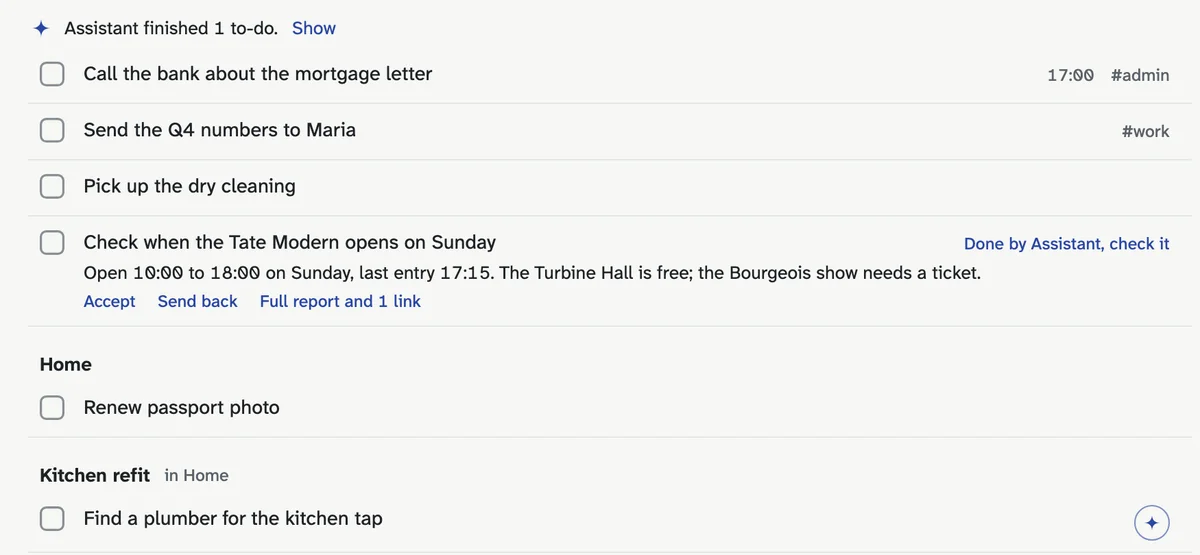
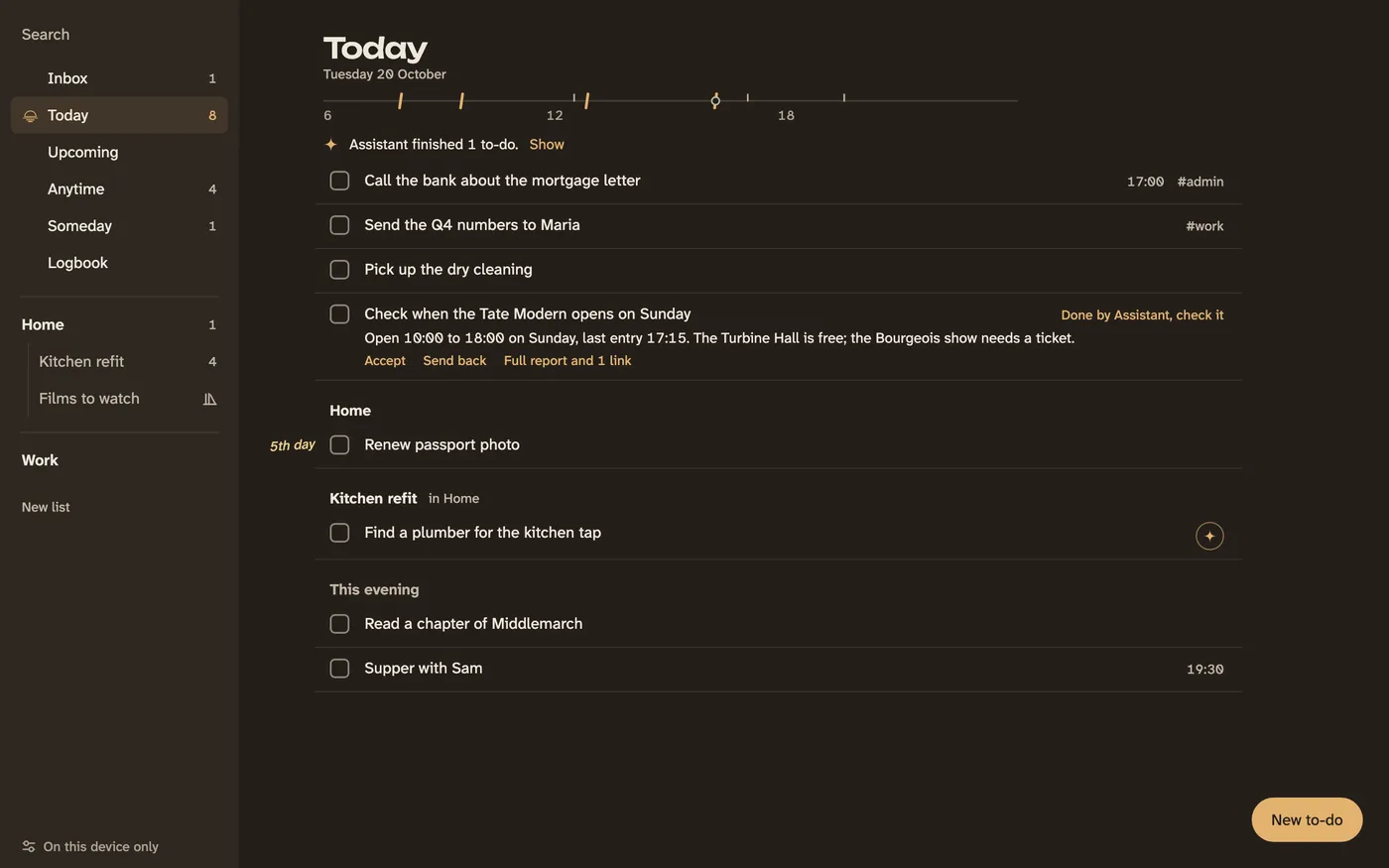
Some to-dos are really questions: when does the gallery open, which air fryer, who can fix the tap. Those rows carry a small mark. Press it and the Assistant looks it up on the web and writes the answer into the row, with its sources. Accept it and the to-do is done, or send it back with a note.
It sees only the to-do you hand it. Five a month are free.
-
It knows your day, nobody else does
- Optional end-to-end encryption: your devices lock every change with a passphrase only you know, so the server keeps only what it can't read
- No ads, no analytics, no tracking, by design rather than by promise
- Bring your lists from Things, Todoist or TickTick, and export everything as a file at any time
One list on every screen you have
The same lists and the same keys everywhere, so what your hands learn on one device works on the next.
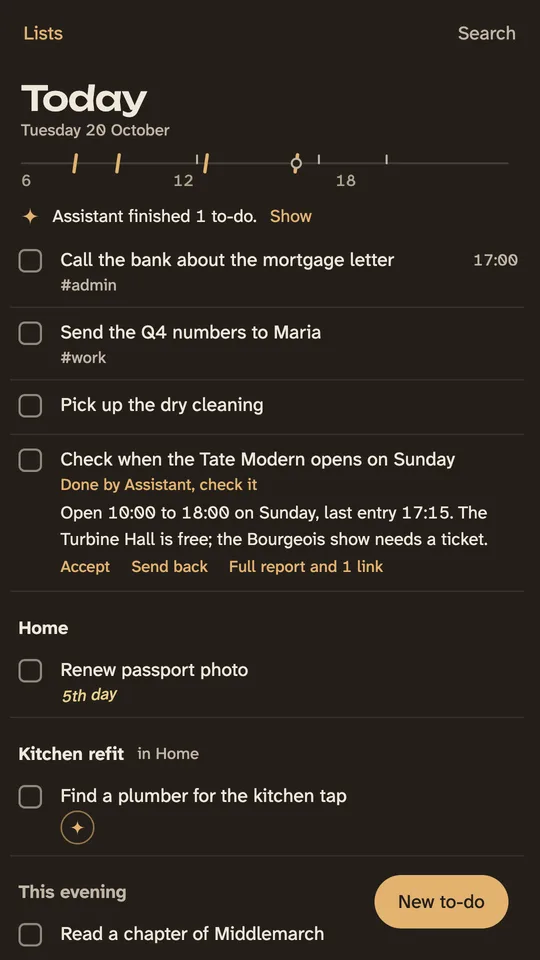
Android phone
A home-screen widget, reminders, and sharing from any app. Say a few to-dos one after another and the phone writes them down, understood on the phone itself.
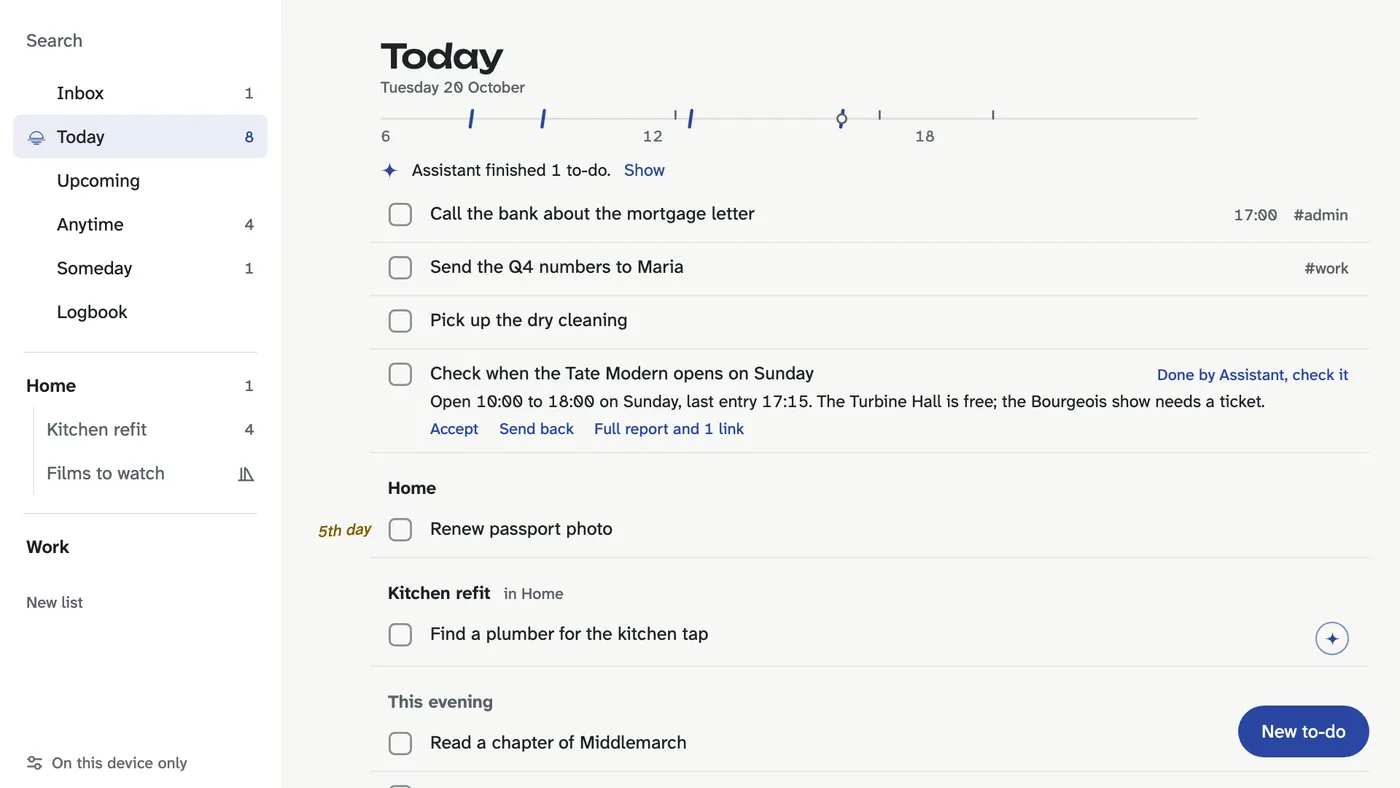
Googlebook
On a Googlebook it behaves like a desktop app: two panes, keyboard shortcuts, right-click menus and a window you can resize.
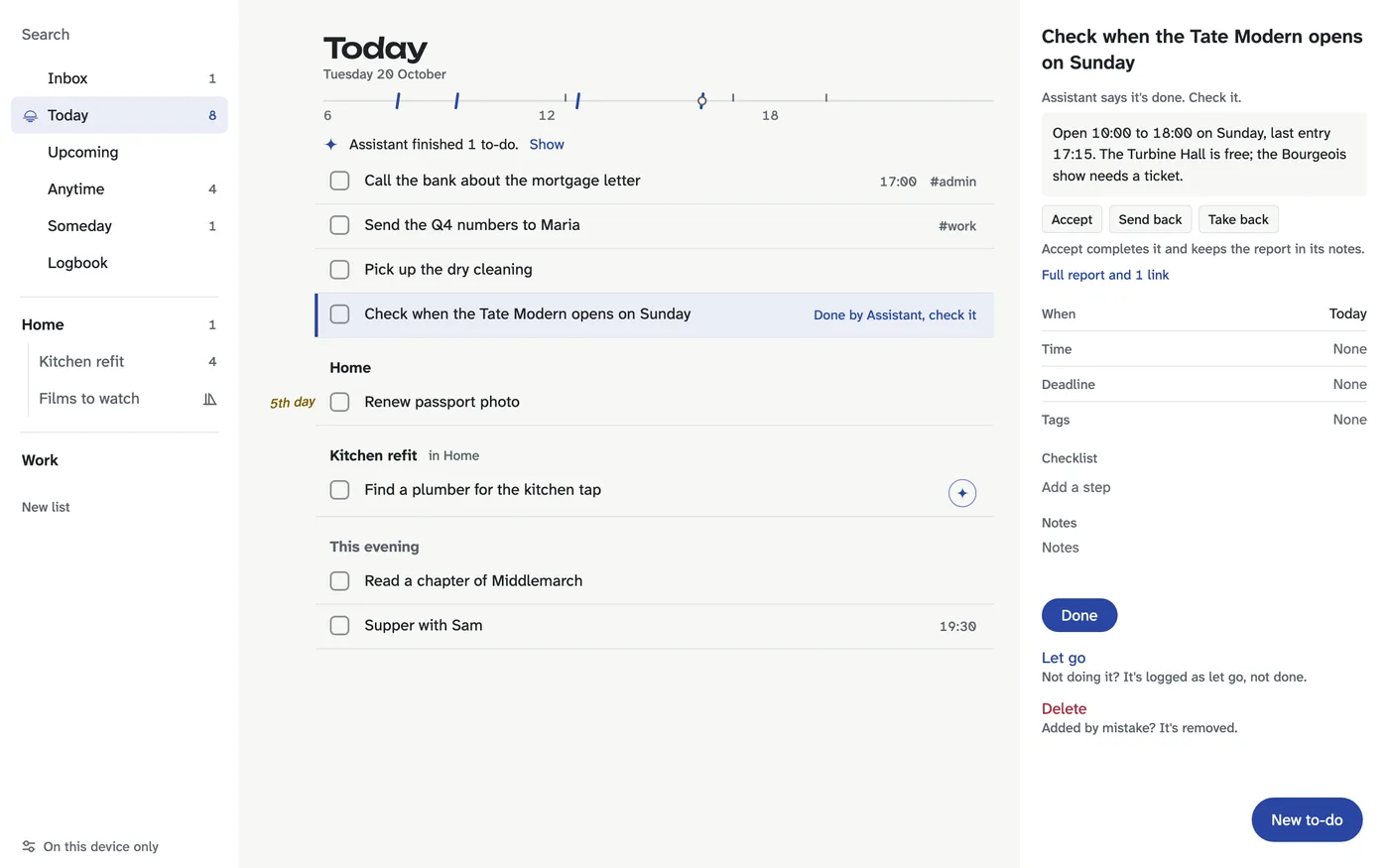
Windows PC
A shortcut that works anywhere, Ctrl Alt Space, opens quick entry, and the tray icon keeps it a click away.
Mac
Close the window and it waits in the menu bar, with quick entry a click away. For Macs with Apple silicon.
╭─ Lists ────────────╮╭─ Today ────────────────────────────────────────────────╮
│  Inbox           1 ││ Saturday 17 October                                    │
│ ▌Today           5 ││ ───────────────○────────────────────────────────────── │
│  Upcoming          ││                                                        │
│  Anytime           ││ ▌       [ ] Call the bank about the mortgage letter    │
│  Someday           ││         [ ] Pay rent                   due Mon 19 Oct  │
│  Logbook           ││         [ ] Book physio                  1/2  #health  │
│                    ││ 4th day [ ] Renew passport photo                       │
│  Home              ││                                                        │
│    Kitchen refit   ││ This evening                                           │
│  Work              ││         [ ] Read a chapter of Middlemarch              │
╰────────────────────╯╰────────────────────────────────────────────────────────╯
 ? keys   / search   : command   o add   x complete         On this device only
Linux terminal, made on Omarchy
A fast native app that starts at once and takes your terminal's colours. Keys feel like Vim. The same program adds to-dos from scripts, puts Today in your bar and opens a one-line capture prompt.
Prefer a window? The window app is the same app as on the Mac. It shares the terminal app's lists and follows your desktop's light or dark.
On Arch or Omarchy, one line installs each as a package. The terminal app:
curl -L -o always-today.pkg.tar.zst https://alwaystoday.uk/download/linux-terminal && sudo pacman -U always-today.pkg.tar.zst
The window app:
curl -L -o always-today-desktop.pkg.tar.zst https://alwaystoday.uk/download/linux-desktop && sudo pacman -U always-today-desktop.pkg.tar.zst
For iPhone and iPad, download it on the App Store.
Free on one device, for ever
Every feature, with no account. You pay only to sync between devices, and one plan covers every device you sign in on.
| Free | Every feature on one device. No account needed | £0 |
|---|---|---|
| Sync, yearly | Your lists on every device you sign in on | £24 a year |
| Sync, monthly | The same sync, paid month by month | £3 a month |
| Lifetime | Sync for as long as the service runs, paid once | £59 |
| Assistant | An AI does the legwork in the to-dos you hand it: 5 free a month, then as many as you need | You choose, from £2.50 a month |
UK prices, VAT included. Every new account gets 7 days of sync free, with no card needed, and refunds come within 14 days with no questions asked. On Android you buy through Google Play; on iPhone and iPad through the App Store, at Apple's own prices of £23.99 a year, £2.99 a month and £58.99 for Lifetime; on Windows, Mac and Linux through Stripe's secure checkout in your browser. The Assistant is its own subscription: on the web you choose the amount; in the App Store and Google Play it's £2.49, £4.99 or £9.99 a month, and every amount gets the same Assistant.
Questions
Is Always Today free?
Yes, on one device, for ever: every list, quick entry, repeats, reminders, import and export. You pay only if you want your lists to sync between devices: £24 a year, £3 a month, or £59 once for Lifetime. Every new account gets 7 days of sync free, with no card needed.
How do I buy a plan, and who sells it?
From inside the app. On Windows, Mac and Linux it opens Stripe's secure checkout in your browser; Stripe sells the plan through its Managed Payments service, shown on your receipt as Onelink. On Android you buy through Google Play, and on iPhone and iPad through the App Store. A plan belongs to your Always Today account, so it works on every device you sign in on, wherever you bought it.
Can I get a refund?
Yes: refunds within 14 days, no questions asked, on top of your legal rights. The help page explains how, for the web, Google Play and the App Store.
What does the Assistant do?
Rows that are really questions, such as finding a plumber, comparing two air fryers or checking opening hours, carry a small mark. Press it and an AI does the legwork with web search, then writes the answer back into the row with its sources. Accept it and the to-do is done, or send it back with a note. It sees only the to-do you hand it, never the rest of your lists. You can also connect your own Claude or ChatGPT instead, at no extra cost.
Do I need an account?
No. Without one, everything stays on your device. An account, just your email address with no password, is only needed to sync.
Can the sync server read my to-dos?
Not if you turn on end-to-end encryption: your devices encrypt every change before it leaves, with a passphrase only you know. Without it, your lists are stored on the server as written, protected in transit and at rest, and never read, sold or analysed. A to-do you hand to the Assistant is the one exception: the server opens that one to-do and sends it to Anthropic, which runs the AI, as the privacy policy explains.
Can I bring my lists from Things, Todoist or TickTick?
Yes. Always Today imports their exports and shows you what it found before adding anything. You can export everything as a JSON file at any time.
Where can I get it?
Out now on Google Play for Android phones and Googlebooks, on the App Store for iPhone and iPad, in the Microsoft Store for Windows, and as a download for Macs with Apple silicon, for the Linux terminal and for Linux desktops.
Something else? Write to apps@guzh.uk. We read everything.
Made in London by Pavel Guzhikov
Always Today is one of a few things he makes and runs. The others:
- Always Weather
A calm weather app for iPhone, Mac, Android and Windows, free on Linux. Drag your thumb through the hours. No ads, no account.
- Agent Hands
Any AI can hire a person nearby for a real-world task, paid in USDC once the proof is accepted.
- Ruminator.xyz
Understand Russia through its local press: dozens of regional outlets read every day, every claim checked word for word. Invite-only.
- LedgerGov.UK
An open P&L of the UK state: where public money comes from, where it goes, and what every promise would cost.
- BoroughBook.UK
Where your council tax goes in Hammersmith & Fulham: the budget, every pledge, every payment over £500.
- tCalendar
A calendar that lives inside Telegram: two-way Google sync, and plain messages become events.